
Practice operations
How to switch practice management software without losing money
Most practices that want to change systems do not stall on the choice. They stall on the switch, because the risk feels asymmetric: the upside is a better week next year and the downside is a lost debtors book. That is a reasonable fear and it is manageable, but only if you sequence it deliberately rather than picking a Monday and hoping.
Here is the order that actually works, and the parts nobody warns you about.
Ask for your data before you give notice
This is the whole ball game and it goes first. While you are still a paying customer in good standing, ask your current provider for an export of:
- The patient list with contact details, ID or date of birth, and medical-scheme membership details.
- Outstanding balances per patient, split between what the scheme owes and what the patient owes. These are different debts with different follow-up, and a single "balance" column will cost you weeks.
- Visit and claim history, as far back as they will give it.
- Your price lists, including any negotiated or practice-specific rates.
Ask for CSV or Excel. A PDF is not a data export, it is a picture of one. If the answer is vague or the timeline is long, that is useful information about the relationship you are leaving, and a reason to get it in hand before you announce anything.
You have a legitimate interest here beyond convenience: clinical records carry retention obligations that outlast any software contract, and under POPIA the practice remains responsible for patient information regardless of which vendor is processing it.
Cut over straight after a payment run
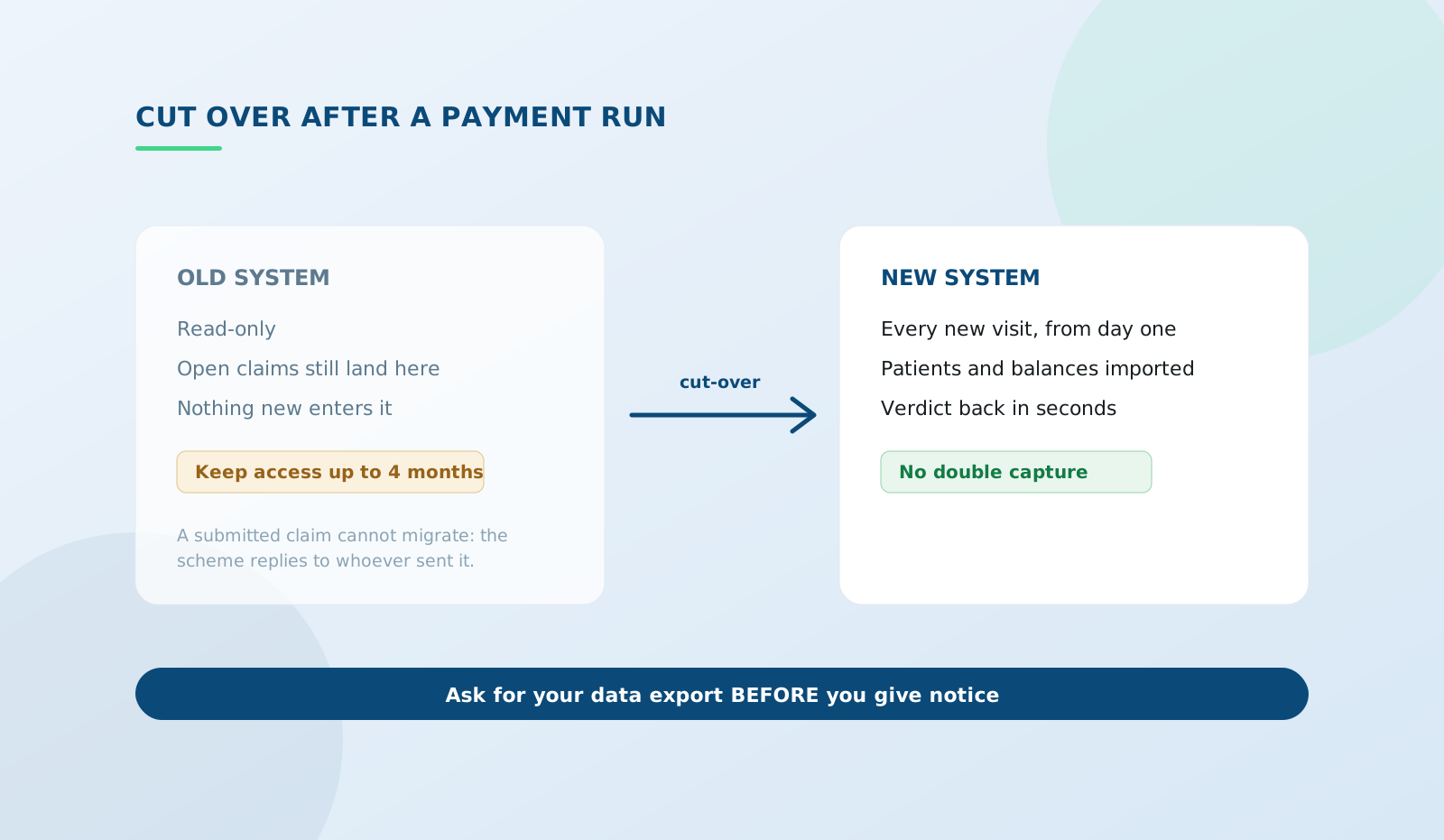
The cleanest line in the month is the moment a payment run has landed and before you capture the next visit. At that point last month's claims are submitted and largely settled on the old system, and everything new starts on the new one.
The worst time is mid-month with a batch of claims in flight, because you then have two systems each holding part of the answer to "did we get paid for this". If you are on a monthly-run scheme, wait for the run. The week of patience is cheaper than the reconciliation.
Claims already submitted stay where they were submitted
This surprises people, so it is worth being explicit. A claim submitted through the old system will have its response returned to the old system, because that is the address the scheme has for it. You cannot migrate a claim mid-flight.
So the rule is: keep read access to the old system until every open claim is resolved. Paid, rejected and re-submitted, or written off. That is usually one to two payment cycles, but South African claims stay live for four months from the date of service, so anything disputed can run longer. Negotiate read-only access for that window as part of leaving, rather than discovering the account is closed when a remittance arrives.
Do not double-capture
The instinct is to run both systems in parallel for a month to be safe. Do not, at least not for capturing. Double capture is exactly how duplicate claims and mismatched balances get created, and a duplicate claim is its own rejection problem to unpick.
Parallel reading is fine and necessary. Parallel writing is the thing to avoid. One system is the place new visits go, from a specific date, and everyone knows which.
What will not come with you
Being honest about this up front prevents an unpleasant week two.
- Claim submission history at the scheme. Your record of it migrates as data; the submission itself does not.
- Anything the old system stored as free text in its own structure. Custom fields, notes bolted into unusual places, and appointment types tend to arrive as a lump rather than as tidy fields.
- Scheme-side configuration. Your practice number, banking details and provider registrations live with the schemes, not with the software. Good news, mostly: they do not need to move. If your banking details are changing at the same time, do not bundle the two. Change the banking separately and let it settle.
- Muscle memory. Budget a fortnight of your reception being slower. It is real and it ends.
A sequence you can follow
- Two weeks out: request the data export. Confirm the format. Check that balances are split scheme versus patient.
- One week out: load patients and price lists into the new system. Capture nothing live yet. Have one person submit a single real claim and watch it come back.
- Payment run lands: reconcile the old system one last time so you know exactly what is open.
- Cut-over day: every new visit goes into the new system. No exceptions, because the exceptions are what break the reconciliation.
- Weeks one to eight: work the old system's open claims to zero. Nothing new enters it.
- Once open claims are closed: take a final full export and archive it somewhere you control, then close the account.
The bit that makes this easier than it used to be
The reason switching used to be genuinely dangerous is that you could not see what was happening. Claims went out in a batch and outcomes came back days later, so during a cut-over you had two blind spots instead of one.
With real-time submission, the new system tells you within seconds whether a claim was accepted. On cut-over day that turns the scariest part into something you can verify as you go, rather than at month-end when the pattern is already set.
Frequently asked questions
Will I lose my patient history?
Not if you export before you leave. That single step is the difference between a clean move and a bad one.
What if my current provider will not give me an export?
Ask in writing, referencing your retention obligations for clinical records and your responsibilities under POPIA for patient information. Most providers cooperate once the request is formal. If it is genuinely refused, take advice, and in the meantime keep the old system readable rather than cancelling.
Can I switch mid-year, or should I wait for the tax year?
Payment runs matter, tax years do not. Your accountant needs clean figures either side of the cut-over, which the export gives them regardless of the month.
Test the new system with one real claim before you commit to anything. Create a free account - the first 10 claims each month are free →